software-eng

How to Build a Real-Time Data Pipeline with Apache Kafka and Apache Spark

How to Build a Real-Time Data Pipeline with Apache Kafka and Apache Spark

By Shubhankar Tripathi • • 5 min read

📝 Description:

Learn how to create a real-time data pipeline using Apache Kafka and Apache Spark for streaming, processing, and analyzing data efficiently. A step-by-step guide with code examples.

🔑 Keywords:

Real-time data pipeline
Apache kafka tutorial
Spark streaming kafka integration
Kafka producer consumer
Big data streaming
Real-time ETL

🚀 Introduction

In a world where milliseconds matter, batch processing just doesn't cut it anymore. Companies today rely on real-time analytics to power everything from fraud detection to customer personalization.

So how do you go real-time? Enter Apache Kafka and Apache Spark — a powerful combo that can help you stream, process, and act on data as it arrives.

In this blog, we’ll build a complete real-time data pipeline that ingests data with Kafka and processes it using Spark Streaming — all with practical examples and best practices.


🧱 Architecture Overview

Let’s take a look at what we’re building:
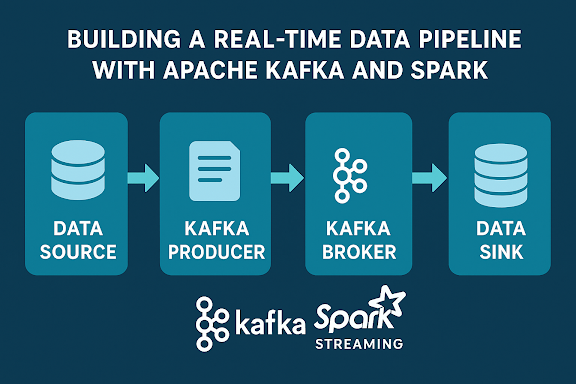


This architecture allows:

  • Decoupling producers and consumers

  • Scalable processing via partitions

  • Real-time insights from Spark


⚙️ Step 1: Set Up Apache Kafka

➤ Install Kafka

sudo apt install default-jdk # Java is required wget https://downloads.apache.org/kafka/3.6.0/kafka_2.13-3.6.0.tgz tar -xzf kafka_2.13-3.6.0.tgz cd kafka_2.13-3.6.0

➤ Start Kafka and Zookeeper

# Start Zookeeper bin/zookeeper-server-start.sh config/zookeeper.properties # Start Kafka Broker bin/kafka-server-start.sh config/server.properties

➤ Create Kafka Topic

bin/kafka-topics.sh --create --topic user-events --bootstrap-server
localhost:9092 --partitions 3 --replication-factor 1

🧪 Step 2: Kafka Producer & Consumer (Python)

✅ Producer: Send Sample Events

from kafka import KafkaProducer import json, time producer = KafkaProducer( bootstrap_servers='localhost:9092', value_serializer=lambda v: json.dumps(v).encode('utf-8') ) while True: data = {'user_id': 1, 'action': 'click', 'timestamp': time.time()} producer.send('user-events', data) time.sleep(1)

✅ Consumer: Read Kafka Messages

from kafka import KafkaConsumer import json consumer = KafkaConsumer( 'user-events', bootstrap_servers='localhost:9092', value_deserializer=lambda x: json.loads(x.decode('utf-8')) ) for msg in consumer: print(msg.value)


⚡ Step 3: Real-Time Processing with Apache Spark

➤ Install PySpark

pip install pyspark

➤ Spark Streaming Code

from pyspark.sql import SparkSession from pyspark.sql.functions import from_json, col from pyspark.sql.types import StructType, StringType, TimestampType spark = SparkSession.builder.appName("KafkaSparkStreaming").getOrCreate() schema = StructType() \ .add("user_id", StringType()) \ .add("action", StringType()) \ .add("timestamp", TimestampType()) df = spark.readStream \ .format("kafka") \ .option("kafka.bootstrap.servers", "localhost:9092") \ .option("subscribe", "user-events") \ .load() json_df = df.selectExpr("CAST(value AS STRING)") \ .select(from_json(col("value"), schema).alias("data")) \ .select("data.*") agg_df = json_df.groupBy("action").count() query = agg_df.writeStream \ .outputMode("complete") \ .format("console") \ .start() query.awaitTermination()


🖥️ Step 4: Choose a Data Sink

You can stream your data to:

  • Dashboards: Grafana (via InfluxDB)

  • Databases: PostgreSQL, MongoDB

  • Lakes: AWS S3, GCS

  • Elastic Stack: For log & event analytics

  • Another Kafka topic: For chaining processes

🌟 Best Practices for Production

PracticeDescription
✅ Use partitions wiselyHelps scale horizontally
✅ Enable SSL & SASLSecure Kafka clusters
✅ Checkpointing in SparkFor fault tolerance
✅ Schema RegistryPrevents data breaking downstream
✅ MonitoringUse Prometheus + Grafana for Kafka health
✅ Dockerize everythingFor reproducibility & deployment

🧠 What You’ve Learned

How to stream real-time data with Kafka Producers How to process and transform it in real-time with Apache Spark How to visualize or store the processed output How to apply best practices to keep your pipeline secure and reliable

📌 What’s Next?

🔗 Coming soon on BitCodeMatrix:
  • Kafka Connect: Automate source/sink connectors

  • Flink vs Spark for Stream Processing

  • Deploying Kafka + Spark Pipelines on Kubernetes

  • Securing Kafka with ACLs and SSL


🔁 Final Thoughts

If you’re working on applications that depend on real-time actions, building this

kind of data pipeline is not just a technical challenge — it’s a business enabler.

With tools like Kafka and Spark, you’re empowered to build streaming solutions that

are scalable, fault-tolerant, and lightning-fast.Got questions or want help deploying

your real-time pipeline? Leave a comment or contact us!